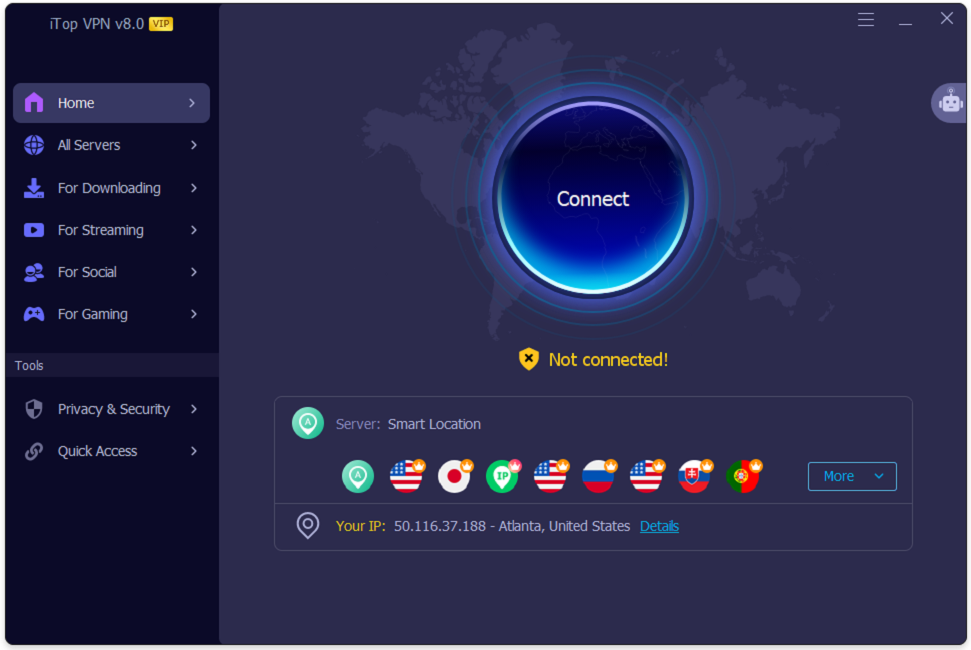
Your IP address acts as your digital fingerprint, providing key information about your internet connection. It enables websites to monitor your activity online, identify the network you are on, and estimate your physical location—all of which can compromise your online privacy.
One of the most effective ways to keep your online activity private is by using a Virtual Private Network (VPN). A VPN routes your internet data through a secure, encrypted server, so websites see the server’s IP address rather than your real one.
When using a reliable solution like iTop VPN, this process becomes effortless. It encrypts your internet traffic, provides a wide network of global servers, and includes built-in tools designed to safeguard your digital identity.
Why Should You Hide Your IP Address?
Because your IP address reveals your general geographic location, websites often use it to serve localized content, restrict access, or allow advertisers to track your browsing habits across the web.
Hiding your IP address adds an essential layer of security, making it significantly harder for third parties to link your browsing behavior back to your real identity.
How Does a VPN Hide Your IP Address?
When you connect to a VPN, the software establishes an encrypted tunnel between your device and a remote server. All of your internet traffic passes securely through this tunnel before reaching the public web.
As a result, the websites and online services you visit only register the IP address of the remote VPN server. For example, if you connect to a server in the UK while browsing from another country, websites will recognize your connection as originating from the UK while keeping your original IP address hidden.
Keep in mind that a VPN does not make you 100% invisible on its own. Websites can still identify you if you log into personal accounts or through browser cookies and fingerprinting. Combining a VPN with smart browsing habits is the best approach to comprehensive online privacy.
How to Hide Your IP Address with iTop VPN
Changing your IP address takes just a few minutes. Follow these simple steps to get started:
Step 1: Download and Launch iTop VPN
Visit the official iTop VPN website or download the Windows installer, then follow the on-screen prompts to install the application on your device. Open iTop VPN after installation. On the main dashboard, you will see a prominent Connect button along with quick-access server location options.
Step 2: Select a VPN Server
Open the server list and choose a preferred country. iTop VPN offers more than 3,200 servers across over 100 locations. For optimal speed and stability, select a server located relatively close to your actual region.
Step 3: Connect to the VPN
Click the Connect button to establish an encrypted tunnel. Wait a few seconds until the interface confirms that your connection is active.
Step 4: Verify Your New IP Address
Open your web browser and search for “What is my IP address?” Compare the displayed IP address and location with your original details—the result should now reflect your chosen VPN server’s location.
Key iTop VPN Features for Enhanced Online Privacy
Beyond basic IP masking, iTop VPN includes several specialized security features to strengthen your overall browsing privacy:
1. Double VPN
Double VPN routes your internet traffic through two separate VPN servers instead of one. This adds a second layer of encryption, offering extra protection when you need heightened privacy.
2. Kill Switch
If your VPN connection ever drops unexpectedly, your device could revert to your standard, unencrypted internet connection. The Kill Switch automatically blocks internet access if the VPN disconnects, ensuring your real IP address is never exposed by accident.
3. Split Tunneling
Split Tunneling lets you choose which specific apps or websites route through the VPN while allowing other traffic to use your regular internet connection. This gives you granular control over speed and privacy.
4. Flexible IP Configuration
Depending on your browsing needs, you can choose between different IP modes—including Best Server IP, Dynamic IP, Static IP, and Super Stealth—for greater flexibility and connection stability.
5. Browser Privacy
Web browsers routinely store browsing history, cookies, and cached files that can expose your online habits. Browser Privacy automatically detects and clears these traces across major browsers to minimize digital footprints.
6. Ads Block
Many online ads contain embedded trackers that monitor your browsing activity. iTop VPN’s Ads Block feature helps eliminate intrusive pop-ups and tracking scripts for a cleaner, safer browsing experience.
7. Dark Web Monitor
If your personal credentials appear in a known data breach, Dark Web Monitor alerts you promptly so you can update your passwords and secure compromised accounts before damage occurs.
Final Thoughts
Hiding your IP address with a Virtual Private Network is one of the simplest and most effective steps you can take to safeguard your online privacy. With its broad global server network and built-in tools like Double VPN, Kill Switch, Split Tunneling, and Browser Privacy, iTop VPN makes it straightforward to secure your connection and browse with confidence.